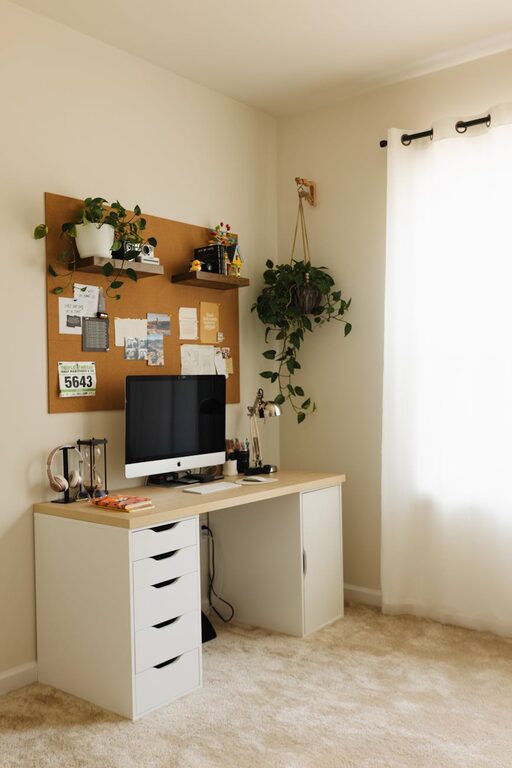
Creating a home office that is both cozy and productive can significantly improve your work-from-home experience. Whether you spend a few hours a week or your entire day working remotely, having a dedicated space designed for comfort and efficiency helps maintain focus and supports your well-being. Here are practical tips to help you create an ideal home office environment.
Choose the Right Location
Selecting the best spot for your home office sets the foundation for comfort and productivity.
– Quiet Area: Pick a quiet corner or room with minimal distractions. Avoid areas near noisy appliances or heavy foot traffic.
– Natural Light: Whenever possible, position your desk near a window. Natural light reduces eye strain and improves mood.
– Space Considerations: Ensure there is enough room for your desk, chair, and additional storage. You want to move freely without clutter.
Invest in Comfortable Furniture
Comfort is key when you spend long hours working.
– Ergonomic Chair: Select a chair that supports good posture, with adjustable height and lumbar support.
– Desk Height: Your desk should allow your forearms to rest parallel to the floor when typing. Adjustable desks or standing desks are good options.
– Foot Support: If your feet don’t touch the ground comfortably, consider a footrest to reduce strain.
Optimize Lighting
Proper lighting reduces fatigue and keeps you alert.
– Layered Lighting: Combine natural light with ambient and task lighting. A desk lamp with adjustable brightness is useful for focused tasks.
– Avoid Glare: Position screens and lights to minimize glare. Use blinds or curtains to control sunlight.
– Color Temperature: Use bulbs with a neutral or cool white light to promote alertness during work hours.
Personalize Your Space
Adding personal touches can create a welcoming atmosphere without dividing your focus.
– Plants: Adding greenery improves air quality and creates a calming environment.
– Artwork: Choose inspiring images or prints that you enjoy, but keep it minimal to avoid distractions.
– Colors: Use soothing colors for walls or accessories. Soft blues, greens, or neutrals promote calmness.
Organize Efficiently
A clutter-free environment helps maintain focus.
– Storage Solutions: Use shelves, filing cabinets, or boxes to keep documents and supplies organized.
– Cable Management: Use clips or sleeves to bundle cables neatly and avoid tangling.
– Daily Cleanup: Spend a few minutes at the end of each workday tidying up your desk.
Incorporate Technology Thoughtfully
Make sure your tech setup supports productivity without being overwhelming.
– Reliable Equipment: Use a good-quality computer, keyboard, mouse, and headset.
– Fast Internet: Ensure your internet connection is stable and fast to avoid interruptions.
– Dual Monitors: If space allows, dual screens can increase efficiency for multitasking.
Set Boundaries and Maintain Routine
Your workspace should support healthy work habits.
– Dedicated Workspace: Avoid mixing your office with leisure areas to mentally separate work and rest.
– Work Hours: Keep regular working hours and take scheduled breaks to reduce burnout.
– Ergonomic Breaks: Stand up, stretch, or walk every hour to stay energized.
Enhance Comfort With Extras
Small additions can make your workspace more inviting.
– Cozy Textiles: A soft rug, cushion, or throw blanket can increase comfort and warmth.
– Air Quality: Use an air purifier or keep windows open for fresh air.
– Background Sound: Some prefer white noise or soft music to help concentration.
Summary
Designing a home office that balances coziness with productivity involves thoughtful choices about location, furniture, lighting, organization, and personal touches. By investing time into creating a comfortable and efficient workspace, you can enhance focus, reduce stress, and enjoy a better work-from-home experience. Remember to regularly evaluate your setup and make adjustments as your needs evolve.