
Creating a productive home workspace is essential for anyone looking to work efficiently outside of a traditional office. Whether you are freelancing, working remotely, or managing a household while working, having an organized and comfortable space can greatly improve your focus and output.
In this guide, we’ll explore simple, practical tips to help you design a home workspace that supports your best work every day.
Choose the Right Spot
Find a dedicated space
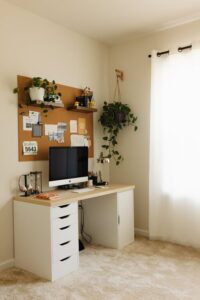
Set aside a specific area in your home for work. This doesn’t have to be a separate room, but it should be somewhere you can consistently use without distractions. A corner of a quiet room or a small desk near a window can work well.
Consider lighting and comfort
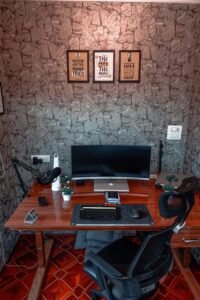
Natural light is ideal, so position your workspace near a window if possible. If natural light is limited, invest in a good desk lamp with adjustable brightness to reduce eye strain. Make sure your chair and desk are at comfortable heights to support good posture.
Declutter and Organize
Clear unnecessary items
A cluttered desk can distract and overwhelm you. Start by removing everything that isn’t directly related to your current work. Keep only the essentials within arm’s reach.
Use storage solutions
Organizers, shelves, and filing systems help keep supplies tidy. Use drawer dividers for small items like pens and paper clips. Label folders and boxes to easily locate documents and tools.
Go digital when possible
Reduce paper clutter by scanning important documents and storing them digitally. Use cloud storage or online folders for easy access and backup.
Optimize Your Workflow
Plan your day in advance
Create a daily to-do list or schedule to guide your work sessions. Prioritize tasks and set realistic goals to stay on track.
Limit distractions
Turn off unnecessary notifications on your devices. Consider noise-canceling headphones if your environment is noisy. Let family members or roommates know your work hours to minimize interruptions.
Take regular breaks
Incorporate short breaks to stand, stretch, and rest your eyes. This helps maintain focus and reduces fatigue.
Personalize Your Space
Add inspiring elements
Include items that motivate and uplift you, such as plants, artwork, or photos. Plants can also improve air quality and add a calming touch.
Choose calming colors
If possible, use soothing colors like soft blues or greens around your workspace. These colors can help reduce stress and improve concentration.
Keep it comfortable
Wear comfortable clothing and adjust the temperature to your liking. A small fan or heater can make your space cozy without being disruptive.
Use Technology Wisely
Invest in essential tools
Make sure your computer, headset, and internet connection are reliable. A comfortable keyboard and mouse can reduce strain during long work sessions.
Use productivity apps
Applications like task managers, calendars, and note-taking tools can help organize your schedule and ideas effectively.
Maintain digital organization
Regularly clean your desktop and email inbox to keep necessary files and messages easy to find.
Maintain and Refresh Your Workspace
Set a cleaning routine
Spend a few minutes at the end of each day tidying up your desk and organizing materials. A clean workspace at the start of each day promotes productivity.
Update when needed
Periodically review your setup. Replace worn-out chair cushions, adjust lighting, or add storage to match your evolving needs.
—
By following these simple tips, you can create a home workspace that is organized, comfortable, and conducive to productivity. Remember that the best workspace is one that suits your personal preferences and work style, so feel free to adjust and improve your area as you go. A well-planned environment helps transform working from home into a positive and successful experience.